
THE WAITLIST
Poker waitlist software players can join from their own phone.
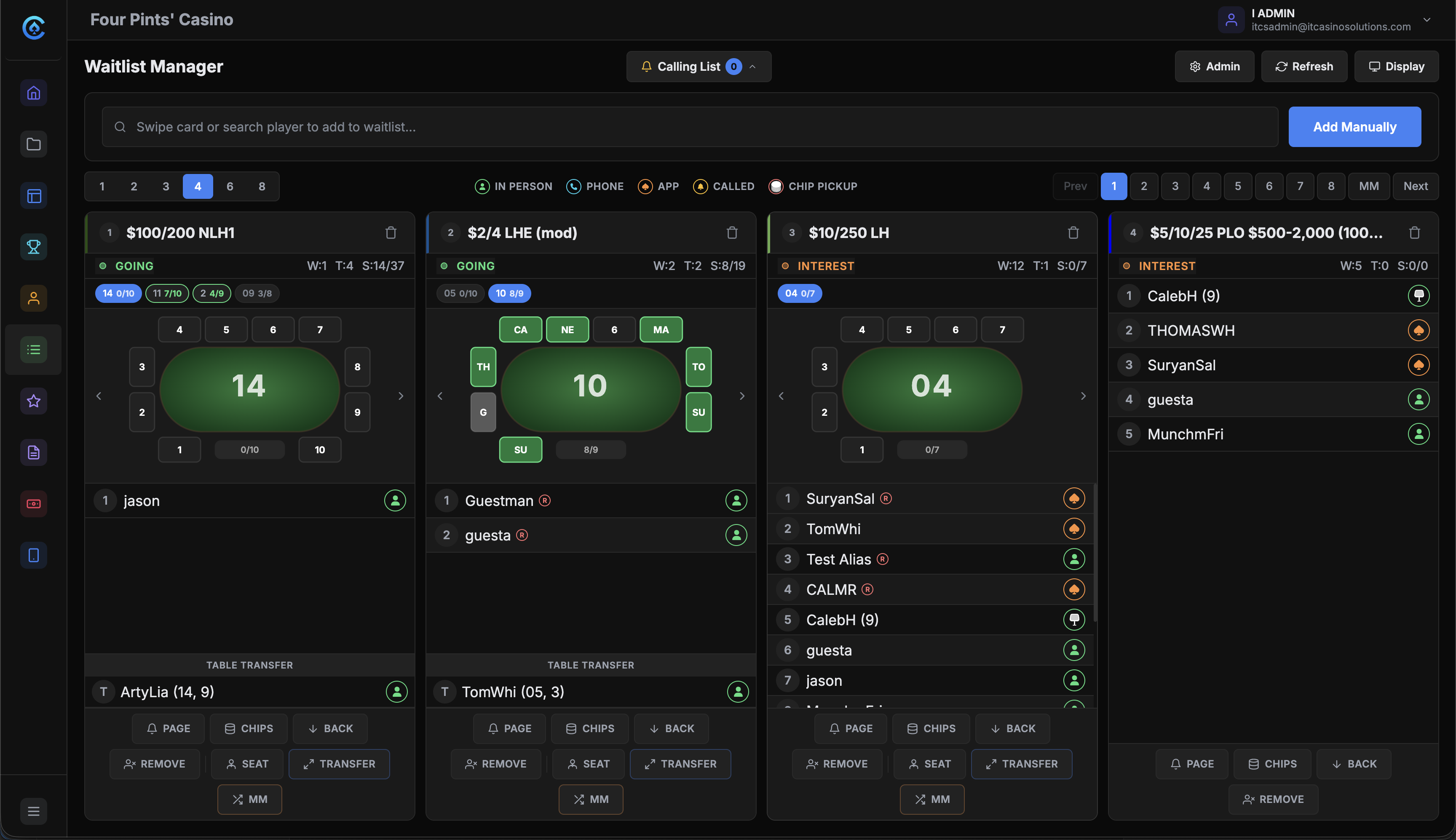
Players join in person, by phone call, at a kiosk or from the app. The board on the TV shows every game and every position. Staff call and seat players from one screen.
The problem.
When players can't see where they stand, they leave. A paper list gets messy fast, and the staff calling names can't keep up on a busy night.
How it works.
- 1
Set up the games.
Each position on the board is one game and limit. Games, limits and sections come from Floor Settings.
- 2
Players get on the list.
Players swipe a card at the kiosk, scan the QR code on the board or join from the app. Staff add walk-ins and phone calls by name or alias.
- 3
Call the next player.
Mark the player called so the rest of the staff know. Players who joined from the app get a text when their seat is ready.
- 4
Seat them from the list.
Tap the empty seat on the floor view and pick From Waitlist. The player comes off the list and the board, and their time starts if the room collects time.
What you get.
The waitlist board
Each game gets its own color card on the TV with its status, the tables running and every player's position. The board pages through games that don't fit. A scrolling bar carries manager messages.
Multi-game entry
A player can sit on several lists at once and take whichever seat opens first. Their position on each list is separate.
Must-moves and transfers
When a table breaks, its players go into their own must-move section. They get priority for the next seat in the same game.
Join from the phone
The QR code on the board opens the room's own branded app in the browser. No download. Players see the games, the waiting counts and their own place in line. Other names stay anonymized.
Included in every plan.
What’s different.
- Several TVs run from one list. Games 1 to 8 can show on one screen and 9 to 16 on another.
- A player who misses an app call isn't dropped. After the ten-minute window, they move to the bottom of the list.
- It needs no special hardware. Any TV with a browser-capable device runs the board, and kiosks use standard touchscreens.
QUESTIONS
About Waitlist Management.
How do players join the waitlist?
In person, by phone call, at the self-service kiosk, or from their phone. The board shows an icon next to each name for how they joined.
Do players need to download an app?
No. The QR code on the board opens the room's branded app in the phone's browser. Players sign in to join a list and can check their place in line any time.
What happens when a called player doesn't show?
Staff mark them called and move to the next player. The room's own policy decides whether a no-show stays on the list. App players who miss the ten-minute window go to the bottom.
Can a player wait for more than one game?
Yes. They can join several lists from the kiosk, the app or the floor. Once they sit, staff choose whether they stay on the other lists.
Does the waitlist work with the floor?
Yes. Seat a player From Waitlist on the empty seat and they come off the list and the board. Every connected screen shows the change, including the dealer tablet and the player's phone.
Want to see Waitlist Management running?
Book a 30-minute demo and we walk through it on a real room setup.
Book a demo See the demoBack to the whole product. Related: Floor Management, Displays & Boards, Player App.