
THE ROOM'S TV SCREENS
Waitlist, clock, jackpots and rotation on any TV, updated live.
Displays put the room on its TVs. Players see the waitlist, the tournament clock and the jackpots. Dealers see the rotation. The floor sees service and time alerts. Each board runs in a browser.
The problem.
Without a board, players walk up to the desk to ask where they stand. Dealers ask where they go next. Tournament players ask the floor about blinds and payouts.
How it works.
- 1
Put a browser on the TV.
A smart TV with a browser works. So does a TV with a streaming stick or a mini PC. No special software or apps.
- 2
Open the board's link.
Each board has its own link. Open it, go full screen, and it loads with the room's games and data.
- 3
Split games across screens.
Running more than one waitlist TV? Give each screen a range of games, like 1 to 8 and 9 to 16, and its own title.
- 4
Let it run.
Boards update in real time. When there are more games or rows than fit, the board pages or scrolls on its own.
What you get.
The waitlist board
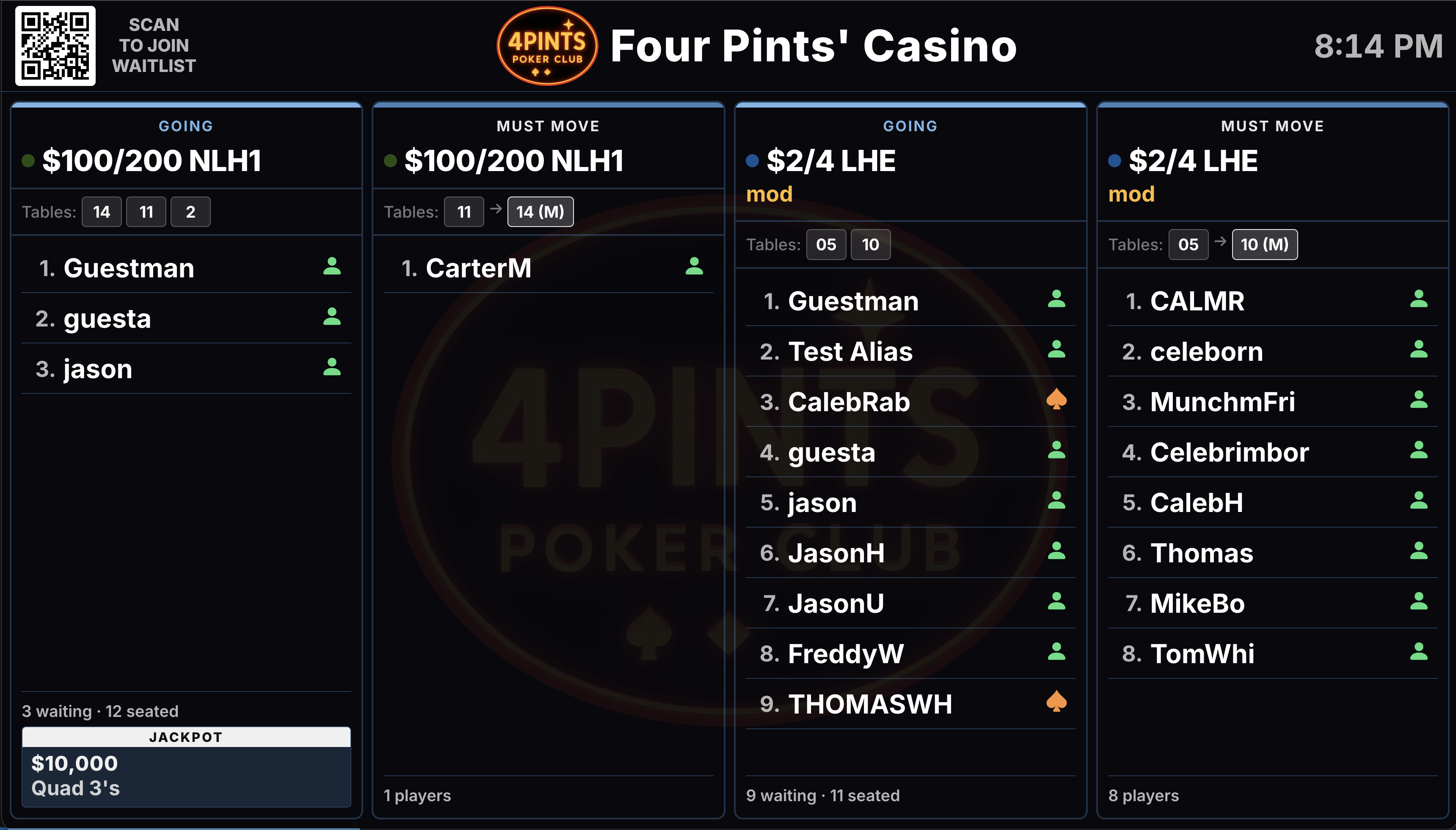
Each running game gets a card with its limits, status, tables and the list in order. Waiting and seated counts and the jackpot show too. A QR code lets players join from their phone.
The tournament clock
Level, countdown, and current and next blinds sit in the center. Players, chips, prize pool and payouts fill the sides. The clock turns red when paused, and audio cues mark the end of a level.
The jackpot display
Each game shows its jackpot, the qualifying hand and any bonus multiplier with its time left. Show every table, or just one table's jackpots.
Rotation and alert boards
Dealers see the rotation order, their breaks and a countdown to the next push. The floor sees dealer service calls and low time credits as they come in.
Included in every plan.
What’s different.
- Every board runs in a web browser. There is nothing to install on the TV.
- Tournament clocks on several screens read from one source, so every TV shows the same numbers.
- The alert board tracks average response time, so management can see how fast calls get answered.
QUESTIONS
About Displays & Boards.
What do we need to put a board on a TV?
A TV or monitor, a device with a web browser and an internet connection. A smart TV with a browser works, or a TV with a streaming stick or mini PC.
Can we split the waitlist across more than one TV?
Yes. Use the custom board link and set a range of games for each screen, say 1 to 8 on one TV and 9 to 16 on the next. Each screen can carry its own title.
Can players join the waitlist from the board?
Yes. The board shows a QR code in the corner. Players scan it with their phone to join the list.
Can we post announcements on the boards?
Yes. The waitlist and rotation boards have a scrolling manager message along the bottom. The tournament clock and the jackpot display have a custom message area too.
What shows on the alert board?
Service calls from the dealer tablets, with the table and the time. In rooms with time collection, players running low on time credits show too. Staff clear each alert once it is handled.
What happens if the tournament controller loses connection?
The clock keeps showing the last data it received. It picks up again once the connection is back.
Want to see Displays & Boards running?
Book a 30-minute demo and we walk through it on a real room setup.
Book a demo See the demoBack to the whole product. Related: Waitlist Management, Tournament Management, Promotions & Jackpots.