
THE CASH-GAME FLOOR
Every table, every seat and every dealer on one screen.
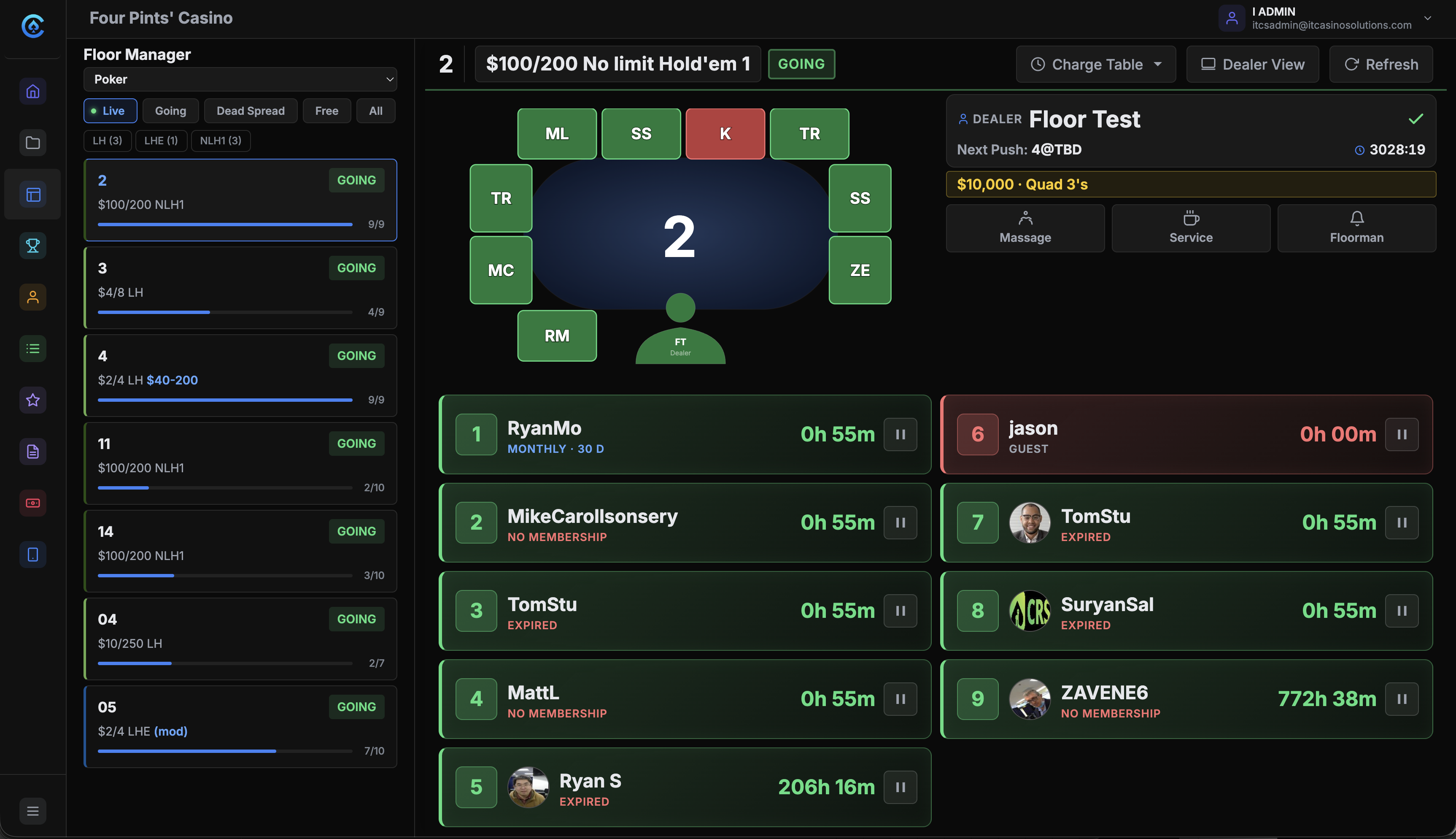
The floor manager is the live map of your cash games. Players check in by card, QR code, RFID or name search. Dealers work the table from a tablet. Every screen shows the same floor.
The problem.
On a busy night the floor changes faster than anyone can walk it. Paper logs get lost, radios miss calls, and by the time someone checks a table, it has already changed.
How it works.
- 1
Set up the floor once.
Sections, tables, games and limits go into Floor Settings. Seat counts and time collection rates live there too.
- 2
Seat the player.
Tap an empty seat. Find the player by card swipe, QR code, RFID or name, or seat a guest under an alias. A player called from the waitlist comes off the list as they sit.
- 3
Run the table from the tablet.
The dealer checks players in and out, pauses and resumes seats, collects time and calls the floor. All of it from the tablet at the table.
- 4
Watch the whole room.
The floor manager sees every table, seat and dealer change as it happens. Filter by Live, Going, Dead Spread or Free, or by game.
What you get.
A live table map
Tables are grouped by section and colored by status. Each card shows the game, the limit and the players seated. Tap one for its seat map and its dealer.
Time collection
Clock-based or participation-based. Every seat shows a credit level: Good, Warning or Critical. Low balances go to the alert board on their own. Charges and purchases are logged.
Transfers and must-moves
Move a player to another seat or another table without checking them out. Their session, time credits and check-in time move with them.
Service alerts
The dealer taps Floorman, Massage or Food/Service. The request shows on the floor manager's screen and the alert board, with the table and the time. Staff clear it once it is handled.
Included in every plan.
What’s different.
- It runs in the browser. A tablet opens its table's link and the dealer is ready.
- Chip pickup keeps a player's place. They go to the top of the waitlist and a timer starts on their chips.
- It works with the hardware rooms already use: card readers, RFID, QR codes and standard tablets.
QUESTIONS
About Floor Management.
How do players get seated?
Tap an empty seat and find the player by card swipe, the QR code in their app, RFID or name search. A guest can sit under an alias and register later at the front desk.
Can a player change tables without losing their time?
Yes. Use Transfer instead of checking them out. Their session, time credits and check-in time go with them to the new seat.
How does time collection work?
A room collects by the clock or by participation. Each seat shows a credit level, and the dealer can add time for a player from the tablet. Charges and purchases are logged for reporting.
What does the dealer need at the table?
A tablet with a web browser, open to its table's link. No app install. If the table has RFID readers, players with cards are picked up as they sit.
Does the floor work with the waitlist?
Yes. When a seat opens, choose From Waitlist on the empty seat and pick the called player. They come off the list and the board, and every screen shows the change.
Want to see Floor Management running?
Book a 30-minute demo and we walk through it on a real room setup.
Book a demo See the demoBack to the whole product. Related: Waitlist Management, Tournament Management, Displays & Boards.