
AT THE DOOR
ID checks at every entrance, with no per-scan fee.
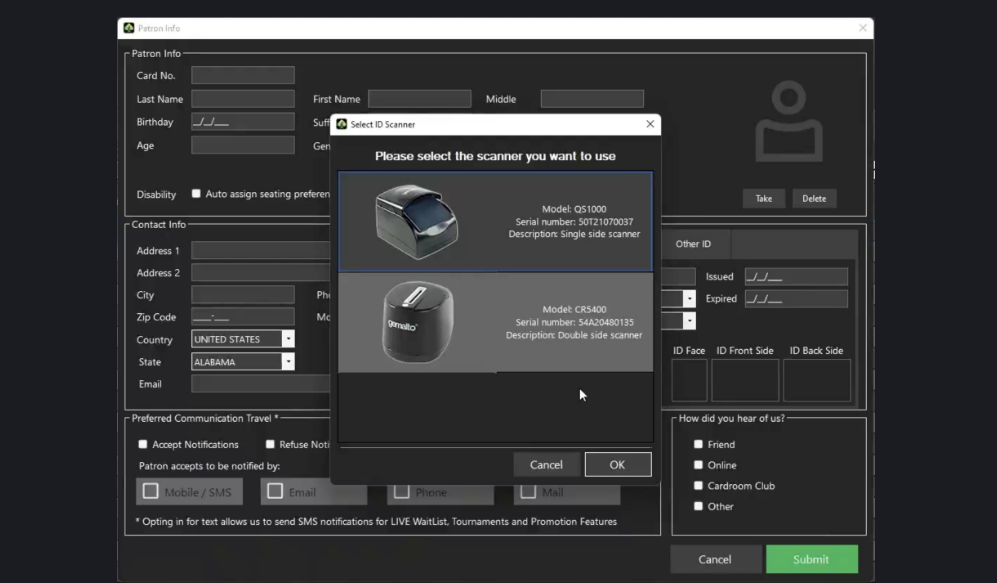
AccessPoint turns each entrance into a security access point. Thales ID and passport scanners read the document, the security interface checks the player, and the entry roll records everyone coming in and going out.
The problem.
A door check on paper or memory misses people. Barred players walk in, nobody knows who is on the premises, and per-scan fees make rooms scan less than they should.
How it works.
- 1
Set up the access point.
Install a Thales ID or passport scanner at the entrance. CardOpz Desktop links it through the Windows driver, so it works like any other device on the workstation.
- 2
Scan the ID.
The scanner reads a driver's license, state ID or passport. The security interface pulls up the player's record or starts a new one from the scan.
- 3
Check the player.
A barred player or a flagged record brings up an alert on screen before they get past the door. The attempt is recorded either way.
- 4
Keep the entry roll.
Every entry and exit goes on the roll with the time and the station. The report shows who is on the premises and flags anyone security needs to see.
What you get.
Thales ID and passport scanners
Driver's licenses, state IDs and passports read by Thales scanners, the same hardware named on the security page. The data goes straight into the player's record.
A security interface at the door
Built for the entrance, not the cage: scan, check, admit. Barred and flagged players stop here, and the desk sees why.
Entry and exit roll
A report of everyone who came in and went out, by station and time, with flags for the players security needs to know about.
No per-scan fee
AccessPoint comes with the Professional plan. Rooms scan every entry without watching a meter.
Included in the Professional plan.
What’s different.
- Scanners connect through CardOpz Desktop and standard Windows drivers, so the room owns the hardware and the data.
- The entry roll covers leaving as well as entering, so security knows who is still inside.
- No per-scan charges: the cost does not rise with the number of players at the door.
QUESTIONS
About AccessPoint ID Scanning.
Which plan includes AccessPoint ID Scanning?
The Professional plan. It is one of the two modules Professional adds, alongside Payouts & Tax Documentation.
What IDs can it read?
Driver's licenses, state IDs and passports, read by Thales ID and passport scanners.
What hardware does it use?
Thales ID and passport scanners on a Windows workstation running CardOpz Desktop, connected through the standard Windows driver. Desktop also connects card printers, webcams and RFID readers.
What happens when a barred player scans in?
An alert comes up on screen before they get past the door, and the attempt is recorded on the entry roll and in the Barred Player Report.
Is there a per-scan fee?
No. AccessPoint is part of the Professional plan, so a room scans every entry and exit without a per-scan charge.
Want to see AccessPoint ID Scanning running?
Book a 30-minute demo and we walk through it on a real room setup.
Book a demo See the demoBack to the whole product. Related: Player Tracking, Membership & Time Sales, Payouts & Tax Documentation.