
This guide walks through the complete player journey at your poker room—what happens at each step, what staff says, and which CardOpz modules are involved.
Before They Arrive (Optional)
Player Discovers Your Room
Player finds your room via Facebook, Google Business listing, or your website. They can access your Player App immediately—no app store download required (it's a Progressive Web App).
Embed options: Add a live waitlist iframe to your website. Post links with meta images to your Player App showing live room data.
Signs Up via SMS
Player enters name, phone, and takes a selfie. They receive an email immediately with their Player ID# and can log into the Player App right away. Opt-in collected here.
Player Arrives at the Room
Front Desk Check-In
Staff scans ID—account created instantly or existing account pulled up. If player signed up via SMS, staff verifies info and commits account. Opt-in collected here if not already captured.
Photo & Player Card
Photo captured via webcam first (or already on file from SMS signup, or defaults to scanned ID image). Then RFID card printed. Players also get a digital player card in the app (QR code).
Membership & Time Sold
Membership sold based on player preference. Time loaded onto account if using front desk time model.
Model A — Front Desk: "How much time would you like to load?" Player loads time onto account for cash games.
Model B — Tableside: Dealer collects time at the table (using cash chips or tip chips) and credits seated players. Paused players earn no time. Time credited in increments to the whole table.
The Key Question
Cash Game Path
Added to Waitlist
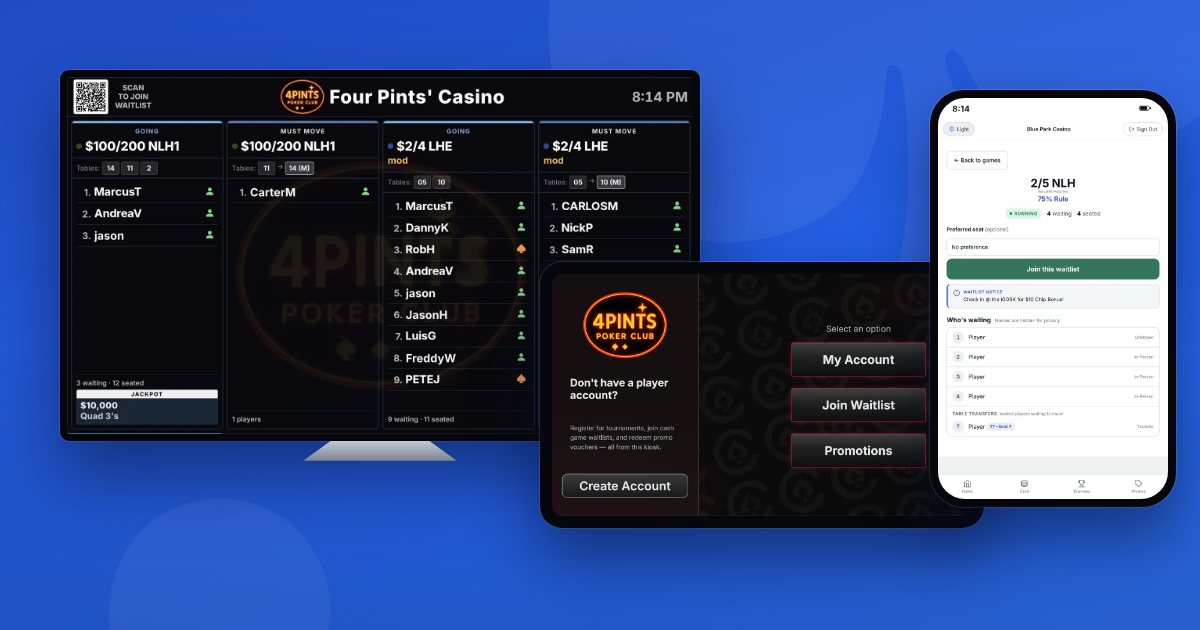
Player picks their games (NLH, PLO, etc.). Added to waitlist with real-time position tracking visible on displays and in the app.
Paged When Seat Opens
Player receives SMS notification. If they don't check in with waitlist desk within the configured time, they roll to the bottom of the list.
Buys Chips at Cage
Player buys chips for cash game. Transaction logged to their account. Can also deposit to Player Bank for future use.
Seated at Table
Player seated by pulling off waitlist, tapping their RFID card, or searching by name. Floor, dealer, or waitlist staff can seat players. Session begins when clocked in.
Tournament Path
Registers for Tournament
Staff shows schedule. Player picks event. Buy-in processed at cage or tournament desk. Can also use Player Bank funds via the app (if enabled by venue).
Assigned Seat
Player receives table and seat assignment. Tournament clock running. Dealer tablet tracks players at the table.
While Playing (Both Paths)
Players can use self-service options without waiting for staff:
🖥️ Kiosk
- Check hours played
- Join another waitlist
- Redeem promotions
📱 Player App
- Same as kiosk, plus:
- Check waitlist position
- View vouchers & messages
- Update game preferences
Cashing Out
🎰 Cash Game
Step 10: Player leaves table. Dealer clocks them out on tablet. Session hours logged automatically. (Dealers also use RFID to clock in/out for their dealer down.)
🏆 Tournament
Step 10: Result recorded. Payouts processed via payout slip—can pay cash or issue tournament vouchers from leaderboard earnings. Custom payouts allowed if different from template.
Cashes Out at Cage
All transactions logged to player account. Cash activity is flagged at thresholds for review.
Getting Them to Return
After the visit, keep players engaged through the Player App:
- Send direct messages about upcoming events or promotions
- Award promotional vouchers they can redeem on their next visit
- Push updates on tournaments, promotions, or cash games they're interested in
- Players can update their game preferences in the app to get relevant notifications
- Advertise special events (series tournaments, VIP cash games) on your white-label PWA
Common Promotion Types
CardOpz supports a variety of promotional configurations:
Time-Based Promotions
Play for X hours on certain days of the week (or certain games/limits) and earn a voucher.
Example: "Play 4+ hours on Tuesday in any NLH game and receive a food voucher."Loyalty Points
Players earn points for cash game play, tournament play, or time played (configurable max per day). Points redeemable for vouchers: merchandise, credit/time sales, membership, or tournament vouchers.
Qualifying Hand Promotions
Hourly high hands with amounts that change as the best qualifying hand is hit during each period. Displayed on high hand boards. Winners tracked automatically for cash game players.
Jackpots & Progressives
Formal bad beat jackpots and progressive jackpots that increase daily. Multi-pool management, contribution tracking, approval workflows, and payout processing all handled in the system.
Drawings, Raffles & Wheel Spins
Time played can accumulate drawing or raffle tickets based on hours. Some rooms set up daily wheel spins—player earns a ticket each day and redeems it at the kiosk to spin for prizes.
What Staff Sees (Reports)
Data flows automatically from player actions. Available reports include:
- Patron Daily Count
- Tournament Registration Report
- Purchase History
- Payout Slips
- Cash Game Session Reports
- Chip Count (flights → Day 2)
- Loyalty Points Reports
- Funds Received Reconciliation
- Shift Reconciliation
- Leaderboard Reports
CardOpz shows barred alerts and each player’s ID status at check-in, and flags cash activity at thresholds for review, including multi-day totals. Tax documents (W-2G, W-9, W-8BEN) come with Payouts & Tax Documentation on the Professional plan. See pricing details for tier comparison.
Hardware at Each Touchpoint
ID Scanner
CR5400 — or AT10K for ID + passport combo (single-side for IDs)
Passport Scanner
QS2000 (optional) — dedicated passport scanning
Card Printer
SOLID 510 (both sides) or 210 (one side) — or no-printer option
RFID Player Cards
Pre-printed or blank. Digital player card also available in app (QR code).
Webcam
Standard USB — player photos
Dealer Tablets
iPad — in-table tray, swivel arm, or in-table case configurations
Thermal Printers
Epson TM20iii (basic) or WiFi-enabled. Voucher printer optional.
Kiosk
Touchscreen PC or Olea kiosk (wall/standalone) with QR reader
Displays
TVs — waitlist boards, clocks, jackpot meters, high hand boards
See CardOpz Hardware Reference for complete details on all configurations. Not sure what you need? Book a demo and we'll help you build a hardware plan for your venue.